Going Deeper into AWS
Full Stack developer lets bring your idea to life.
Uptil here we have covered the following concepts
EC2 ✅ Linux ✅ Node/Express ✅ PM2 ✅ Nginx ✅ DNS ✅ Cloudflare ✅ HTTPS/TLS ✅ Let's Encrypt ✅ Certbot ✅
If you havent checked the previous two posts you can checkout them below
IAM Identity Center
Before moving any deep lets learn a bit about AWS IAM identity center. It is the recommended approach for creating a user for logging in other than your root user. As using root user for daily tasks in not a recommended approach.
There are two ways
IAM identity Center User
Classic IAM User
We will first explore the IAM Identity Center way
Lets add a new user , if its your first in the IAM you will need to enable it and configure it go ahead and configure it with default settings (I would suggest select the single region instead of multi if you dont want the extra billing cost of KMS more on that later ) , clicks Users and create a new User
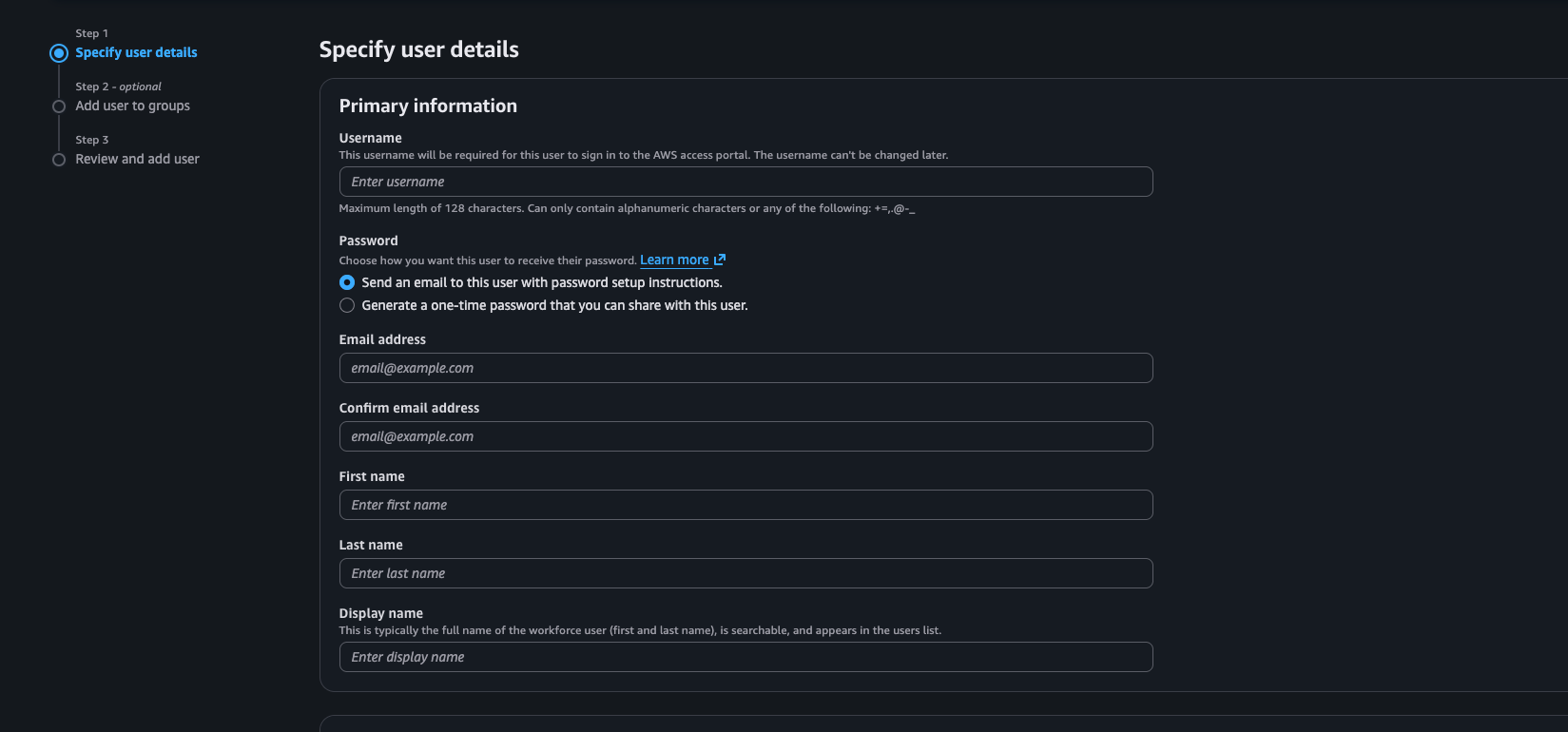
You have to understand the concept how we handle permissions
Permissions are assigned to groups and then these reusable groups are assigned to users.
Or some specific permissions can also be directly assigned to users.
To give permissions go to Multi Account permissions.
Select Your User -> Its Group and create a permission set , I used Administrative access and assign it to the group.
To Sign in We will use Access Portal -> AWS Console. You cannot directly login into the console.
Classic IAM User
Now we will explore how to create a classic IAM User.
Go to IAM -> IAM Users , set Username , password and select the option of I want to create an IAM User. You can attach policies directly to User. I would recomend create a group then assign that group to Users.
Networking in AWS
Lets discuss the elephant in the room. Our todays topic is Networking in AWS.
Uptil now we were using the default VPC which AWS has created for us in every region but this not enough , when we need security we need to take control of how traffic flows in and out of our compute and nobody can access our data.
We will start by creating a VPC. ( Virtual Private Cloud) Think of it as walls around your computing resources. You control what comes in and out of the VPC. You will specify the region and the IP range for the VPC using CIDR Notation more on this later.
Then we can create Subnets in VPC which provide us more granular control over access. You can define public and private subnets in a VPC. To define a subnet you need the VPC , Avaliability Zone and a IP Range.
Networking Basics Revision
Now we have already discussed what is an IP. Today we will discuss it in detail.
An IPv4 has four numbers seperated by dots 10 . 1 . 0 . 25
Each number can range from 0 to 255. Computers see the binary behind each number. Each number is 8 bits so total there are 32 bits in an IPv4 address.
So suppose an IP 10.1.0.25 is not enough we dont know which part identifies the network and which part identifies the device. To solve that we write 10.1.0.25/24 This is CIDR notation. You know IPv4 has 32 bits , the /24 represents that the first 24 bits are the network bits.
    NETWORK                    HOST
 xxxxxxxx xxxxxxxx xxxxxxxx | xxxxxxxx
To calculate the number of availiable IPs we can use this formula
Number of IPs = 2^(32 - CIDR)
So in this case = 2^(32-24) = 2^8 = 256
What is a subnet , a subnet is basically a smaller network carved out of a larger network. So if our VPC has 256 Ips and i want to divide it into 2 subnets like a private and public subnet and each can have 128 Ips.
We will specify the range for Public Pubnet as 10.1.0.0/25.
and the range for private subnet will be 10.1.0.128/25.
Internet Gateway in VPC
Now as you know , whatever we put in a VPC is isolated and cannot be accessed. But if we have a website which we want to put on the Internet we need to attach a Internet Gateway provider. Basically it connects the VPC to the internet.
Now if you are following up go in AWS Console -> VPC , create a VPC give it a name and IP range keep rest of the things as default and create a VPC. and then on the left panel there will be subnets. Create two subnets according to the above give IP range. For this example stick to 256 IP range for the VPC. and 128 IPs in each subnet. Once done take a break and come back.
Create a internet gateway just give it a name and then make sure you attach it to the VPC.
For those scenarios where we dont need internet access and we need secure connection to lets say on premise server to AWS Resources in a VPC you can attach a virtual private gateway more on this some other time.
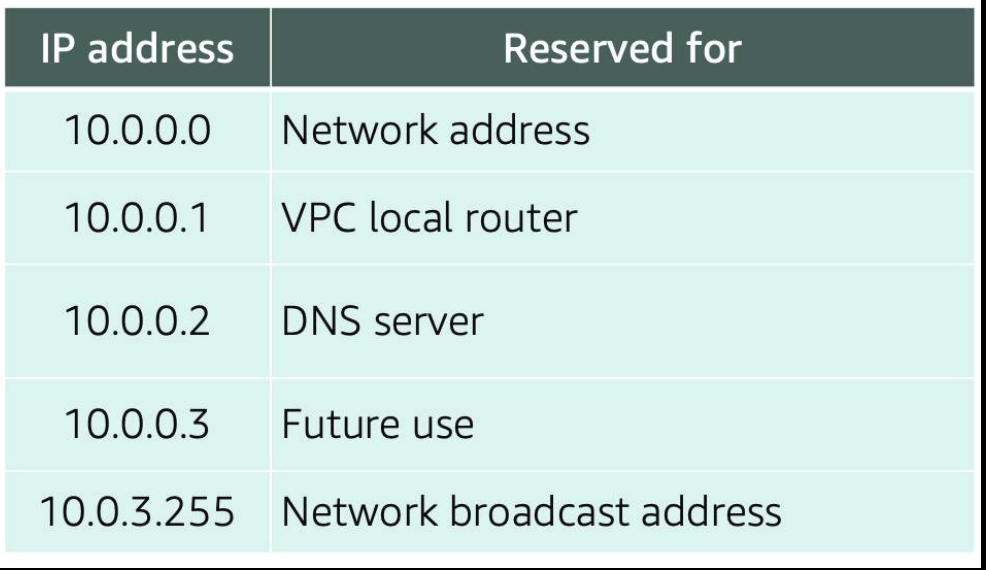
5 IPs per subnet are reserved by AWS their detail is given below in the table.
Architecture Design
What we will design is illustrated below
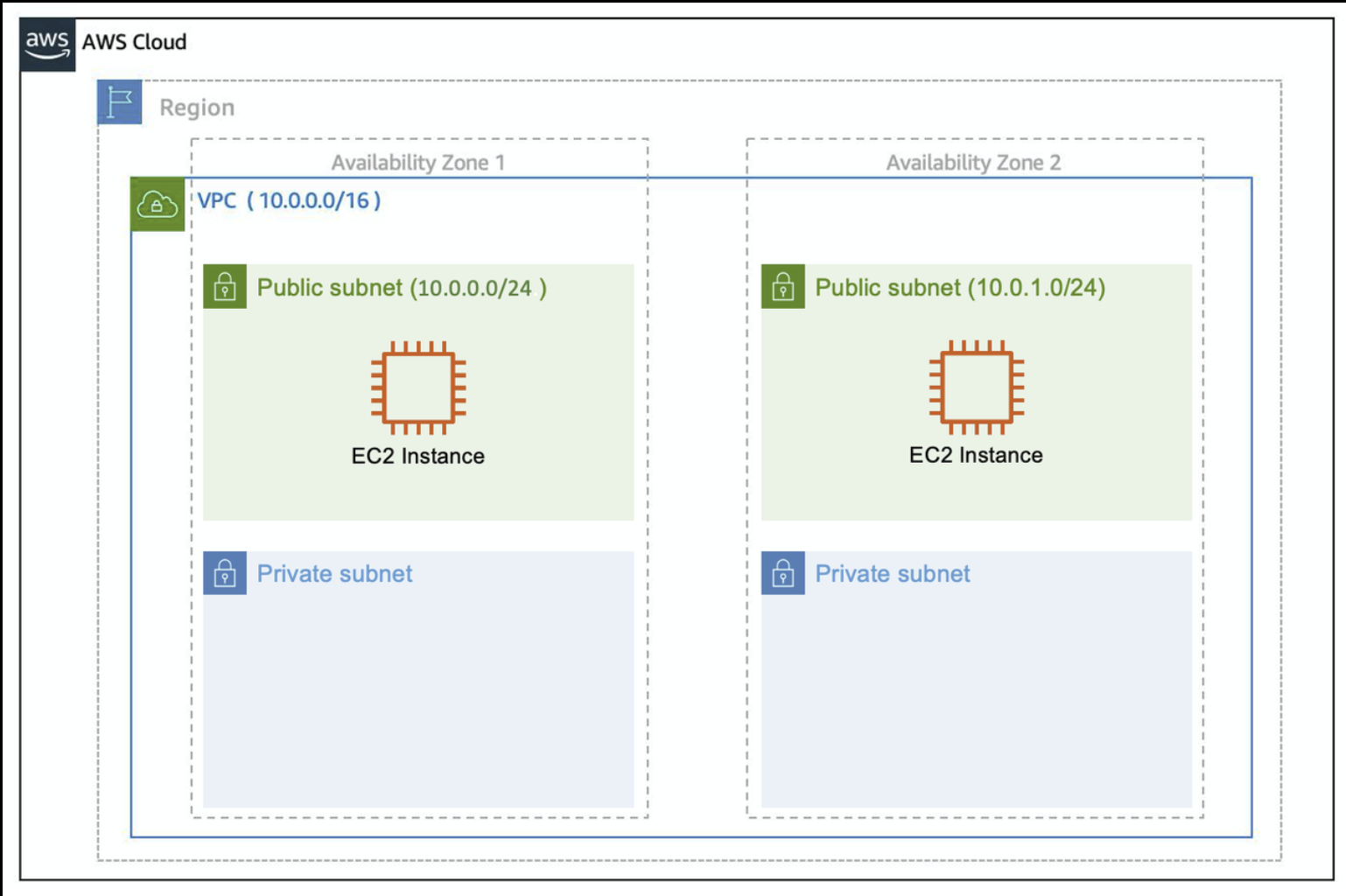
We have a internet gateway attached. Which connects our VPC to the internet. But we still need to redirect the traffic to the correct subnet.
How we do that is using Route table. Initially AWS has setup a main route table for us which has configured the local routing for all the things inside the VPC.
So in the route table we need the following entry
0.0.0.0/0 ------> Internet Gateway.
So traffic from all over the world can come to our Internet Gateway. and also outbound traffic can use the gateway to reach our users. So repeat after me so you can not confused. A Subnet to be a public subnet it must have a route to the Internet Gateway. Else It is considered a Private subnet. So what we will do is create a custom route table add route for igw and associate it to our public subnets. See the below diagram for further clarification.
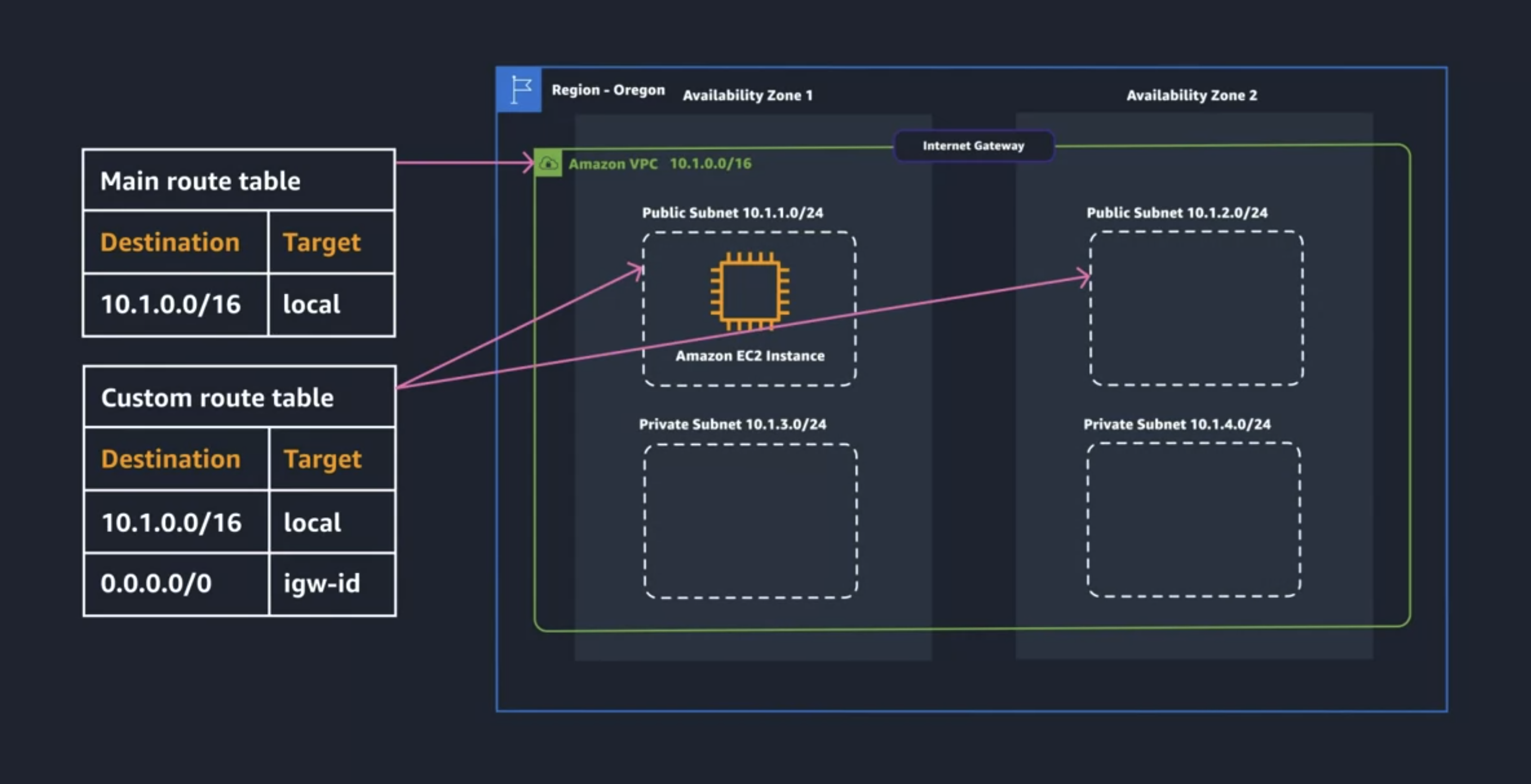
coutesy AWS Cloud Architect Course
Ensuring Security in a VPC
As you know a VPC is isloated from internet traffic by default but when we allow internet access we have to secure our VPC. We have two things for that
Network Acess Control List (ACLs)
Security Group
Talking about the Network ACL is kind of like a firewall , which is defined at each subnet level and defines what kind of traffic enters or leave your subnet.
When you go into the network ACL there will be two types of rules in-bound and out-bound. By default
Security Group on the other side is defined on the Instance level so if i have two EC2s in two different AZ i will have a security group around each.
I would love to continue but absorb till here and we will further go in depth covering fine grain control , scalabiity and much more in the upcoming blogs.